
Form 1099-K is automatically sent if you have a Stripe account. This is required by the IRS.
About the Stripe 1099-K:
If you had over $20,000 in payments and over 200 transactions in the 2025 calendar year, you will receive an email from Stripe with the subject "Your ActivityHero 1099 tax form is ready". This email has a button to View 1099 Tax Form.
When you click the button, you are directed to log in to your Stripe account and then you will see a screen like this:
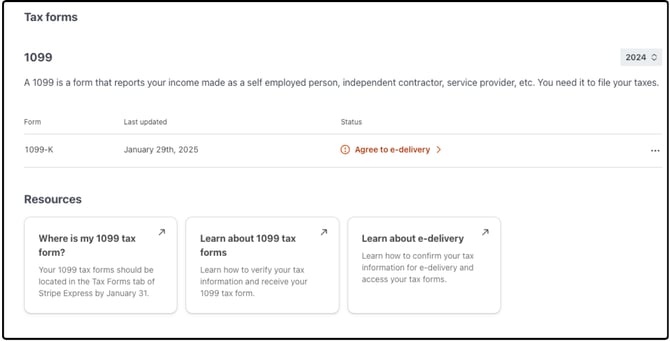
Click on the Agree to e-delivery button to see the next screen. This is a list of disclosures.
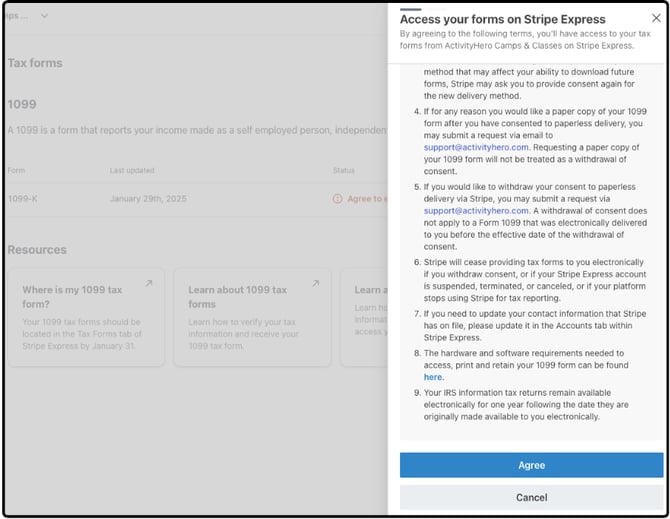
After you click Agree, you will be able to choose paperless delivery, which allows you to view the 1099 form online, or you can choose to also be mailed a copy of the 1099 form.
Please choose the mailed copy only if it is needed. Stripe charges the platform (ActivityHero) a fee for mailed forms, and opting into paperless delivery will reduce waste and fees.
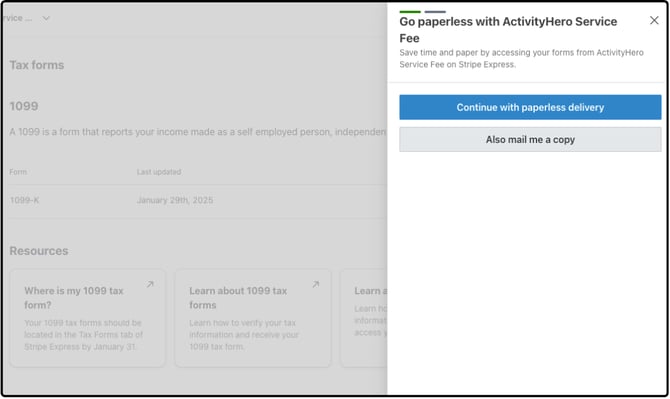
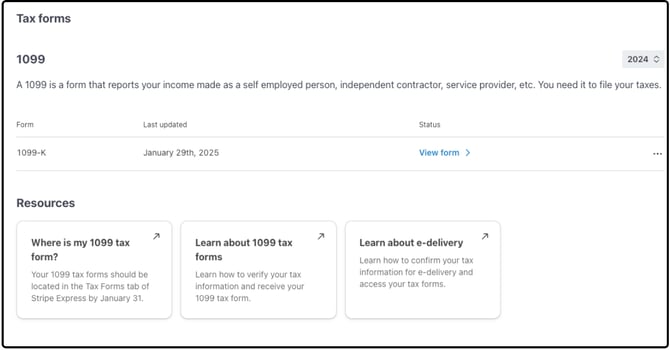
After you make your selection, you will be able to click the View Form link to see your actual 1099-K.
The amount reported in the Stripe 1099-K is the gross amount of credit card transactions. It does not deduct credit card refunds (if any), credit card fees, and ActivityHero fees. The amount that was deposited to you during the year is lower due to deductions from credit card refunds (if any), credit card fees, and ActivityHero fees. And, there may be variances if the registration was in one year, but the deposit wasn't until the next year.
- Transaction or Create Date: when the credit card user completes the charge and is the date used by ActivityHero in its reporting.
- Available on Date: when Stripe makes the funds available in the Stripe account. This is typically one day after the Create Date but can range from one to five days. This date is used for Stripe's 1099-K reporting.
- Payout Date: when the funds are actually paid out. This will most closely align with your bank statement deposits.
Most businesses typically deduct refunds from their income and categorize credit card and other fees as expenses.
You will find a summary of refunds and fees paid in a report called "Credit Card Transaction Summary" in the ActivityHero Dashboard (go to Registration Reports, then choose Annual Report).
The amount "credit card & fees deducted" is the amount deducted from your registration payments made by credit card. The amount you received from registrations should be (credit card transactions) - (refunds) - (credit card & fees deducted).

The "Other ActivityHero Fees" amount includes fees that were paid directly to ActivityHero, such as setup fees and boost fees.
Please review this section carefully and send it to your accountant to recognize your revenue and expenses properly.
What if I didn't receive a 1099-K?
If you had less than $20,000 in credit card transactions or less than 200 transactions in 2025, a 1099-K form is not issued. However, you can find a summary of the credit card transactions, refunds and fees paid in a report called "Credit Card Transaction Summary" in the ActivityHero Dashboard (go to Registration Reports, then choose Annual Report).
If you do not have a WePay or Stripe account and you received payments from ActivityHero, you will receive a 1099-K form directly from ActivityHero if your 2025 activity exceeded the reporting threshold of $20,000 AND 200 transactions. If you established your own Stripe connected account mid-year, note that the threshold will be applied to your total 2025 activity.
Stripe will have the 1099 tax form under the Tax Forms link by January 31. Stripe will also mail the form unless you opt for paperless delivery.