
You can charge students by the month when you create the session as "monthly recurring". You will be asked for the start and end dates for a monthly recurring class, and families can enroll any time within those dates. You can make the end date up to two years after the start date.
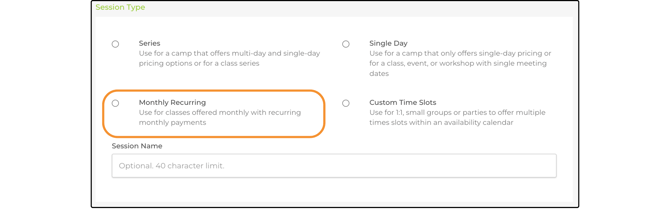
This option will let families select a start date when they register. Then they will be charged each month on start date selected by the family. Note that there will not be an end date.
.png?width=670&height=357&name=Article%20Updates%20(2).png)
The family's credit card will be charged every month. You can cancel or pause the monthly enrollment on your Registrations page.
.png?width=186&height=287&name=Article%20Updates%20(12).png)
This option can be used for online or in-person sessions.
You can see the details of
Editing a Monthly Recurring Payment Schedule
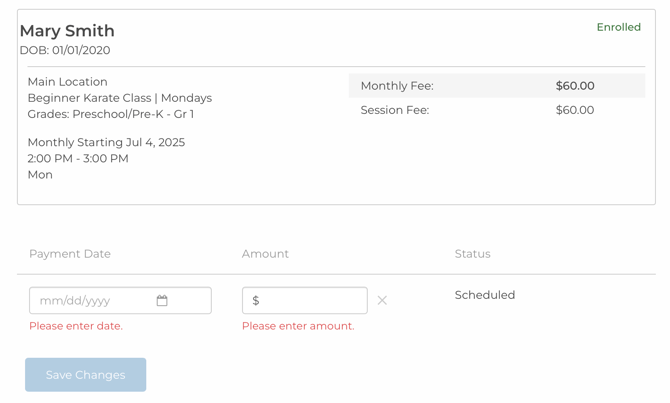
Providers can now edit a registrant's Monthly Recurring Payment schedule — similar to how Payment Plans can be adjusted.
To edit a Monthly Recurring Payment:
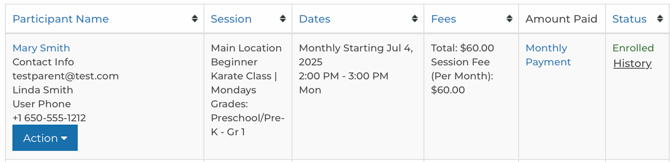
- Find the registration and click the blue Monthly Payment link.
- Make your desired changes to the payment schedule — you can update the amount or due date of an existing installment, or remove a pending installment.
- Click Save.
- Optionally, add a note in the Note to Parent field to include a personalized message in the notification email.
Note: Only installments with a Pending status can be edited or deleted. Installments that are Completed, Cancelled, or Failed cannot be modified.

“Other” fee for monthly recurring sessions
When a provider/district wants to charge a different monthly fee amount, they can enter the custom value as “Other”.
Select Actions/Edit and enter the special price in the "Other" field.
